


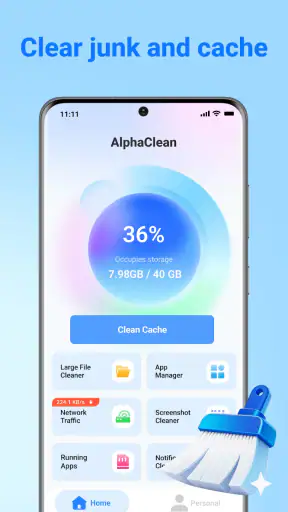
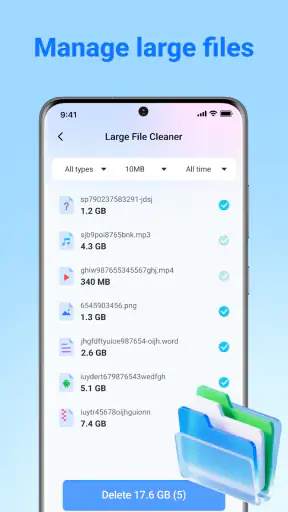
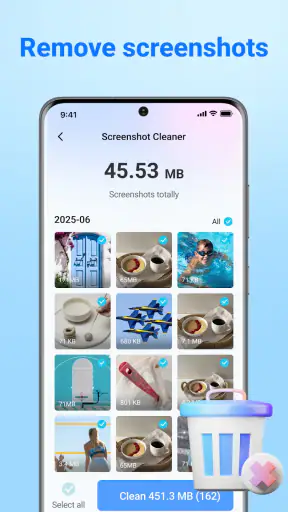
Running out of phone storage rarely happens at a convenient moment. It usually appears when I am trying to take a photo, install an update, download a video, or save an attachment. AlphaClean: Junk Cleaner is a free tools app from Ovifocus Limited that aims to make that cleanup less frustrating by bringing junk-file removal, storage recovery, and app organization into one place. After spending time with it, I see it as a practical maintenance tool rather than a dramatic speed booster. Its value is in helping me find space and make routine cleanup easier, especially on an older Android device that is constantly close to its limit.
The app is available to everyone and supports Android 7.0 or later, which gives it a broad potential audience. It has reached over a million installs and holds a 4.2 average from around a thousand ratings, so it is not an obscure experiment with no visible user base. At the same time, I would not treat popularity as proof that it will transform every phone. Storage conditions vary widely, and the results depend much more on what is actually taking up room than on the cleaner itself.
How AlphaClean feels during everyday cleanup
A quick first pass, with sensible expectations
The first thing I look for in a cleaner is whether it reduces the work involved in finding unnecessary files. AlphaClean is built around that simple idea. Instead of opening separate system menus, checking folders manually, and jumping between installed apps, I can use one tool as a starting point for a storage review. That is useful when I know my phone is full but do not immediately know why.
Its perceived speed is best understood as the speed of the inspection process, not as a promise that the phone itself will suddenly become faster. A scan can feel quick when the device has a manageable amount of data, while a phone packed with media and app leftovers naturally gives the app more to examine. I appreciate this distinction because many cleaning tools encourage unrealistic expectations. Removing clutter may improve available space, but it does not automatically repair a weak battery, upgrade a slow processor, or make every app load instantly.
For a first cleanup, I would start with the broad scan and then treat the results as a list to review rather than an instruction to delete everything immediately. This is one of the most important habits with any junk cleaner. Temporary files are usually easier to question than personal photos, downloaded documents, voice recordings, or offline media. The useful workflow is scan, inspect, remove only what I recognize as disposable, and then check whether the recovered space solves the original problem.
Where the app saves time
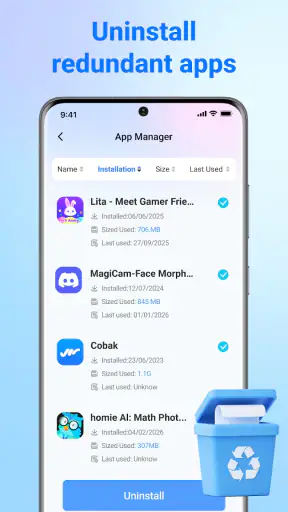
The strongest convenience is not a flashy visual effect; it is the reduction of small decisions. When storage is crowded, I may already know that some apps have accumulated leftovers or that I have forgotten about old downloads. A central cleanup screen gives me a more focused place to begin. AlphaClean also includes app organization, which makes it more relevant to people whose storage problem comes from installed applications rather than files alone.
I find that especially helpful after a period of trying many apps. A phone can collect games, shopping tools, photo editors, and one-time utilities that are no longer used. Looking at those apps as a group makes the cleanup decision easier than discovering them randomly while scrolling through the launcher. The trade-off is that organization still requires personal judgement. An app that looks inactive may contain saved work, local settings, or content I want to keep, so I would not remove anything simply because it appears old.
A useful trick is to use AlphaClean before a specific task rather than waiting until the phone becomes unusable. Before a long trip, I would review space, remove disposable clutter, and then decide how much room is needed for maps, photos, or entertainment. Before a system or application update, I would perform a smaller review focused on freeing enough space without disturbing personal files. This makes the tool part of a routine instead of an emergency button.
What happens when the phone is under pressure
Heavy-use moments are where a cleaner either proves convenient or becomes another source of friction. Imagine I am at an event and my camera refuses to save another image. I do not want a complicated file-management project; I need to locate safe, removable clutter quickly. AlphaClean can serve as a first response in that situation, particularly if the shortage comes from accumulated junk or apps I no longer need.
However, cleanup results can be modest when the real problem is personal media. If most of the storage is occupied by high-resolution photographs, videos, music, or large downloads, a junk-cleaning pass may not recover enough space. In that case, the better solution is to review those files directly, move important material elsewhere, or remove content I genuinely no longer need. I would not blame the app for failing to erase personal data that should never be treated as disposable.
Another demanding moment is a phone with a very large collection of installed apps. Organizing that collection can take longer simply because there are more choices to examine. I prefer a selective approach: begin with apps I have not opened in a long time, then check whether they contain offline content or account-related data before uninstalling. This is slower than tapping a universal delete button, but it protects against the most annoying kind of cleanup mistake: recovering space while losing something useful.
Resource demands also matter during a scan. On a newer phone, an inspection may feel like a minor background task. On an older device, especially one already struggling with low free space, I would run cleanup while the phone is idle and connected to power if necessary. I would also avoid launching several demanding apps at the same time. That is not a special requirement unique to AlphaClean; it is a sensible way to prevent any storage-management operation from competing with gaming, video editing, or large downloads.
Stability and confidence before deleting
For me, reliability in a cleaner is less about how many buttons it offers and more about whether it supports careful decisions. A stable tool should make the review process understandable, keep the cleanup action clear, and avoid encouraging rushed deletion. AlphaClean’s role is strongest when I use it as an assistant for locating clutter, not as an automatic authority over my files.
I would still build a recovery habit around it. Before a major cleanup, I would make sure important photos, documents, and recordings exist somewhere safe. I would also avoid cleaning immediately before a deadline, a trip, or an important recording session. If something unexpected happens during any storage operation, having a separate copy matters more than the convenience of the tool.
Recovery also means knowing what to do if the expected space does not appear. I would first refresh the storage view, then check the system’s own storage settings to see which categories are actually largest. If the missing space is tied to a particular application, I would inspect that app directly rather than repeatedly running the same scan. This comparison is valuable because a third-party cleaner can help locate a problem, while Android’s built-in controls may provide the more precise action for a specific app or file category.
That is also where AlphaClean should be compared with the usual alternatives. Android’s native storage tools are often the safest choice for users who want the fewest extra layers and are comfortable navigating system settings. A dedicated file manager is better when I need to inspect folders, rename items, move files, or preserve a detailed personal archive. AlphaClean is more appealing when I want a simpler starting point that combines clutter cleanup with app organization. It sits between manual file management and completely hands-off automation.
Older phones and practical device limits
The Android 7.0 minimum makes the app accessible to devices that are no longer on recent software. That matters because older phones are often the ones most affected by storage pressure. A person using an older handset may not have the same free space, memory headroom, or modern system conveniences as someone with a current flagship. For that audience, even a modestly useful cleanup workflow can be worthwhile.
Still, compatibility does not mean identical performance on every supported device. A phone with limited free storage may take longer to inspect than a lightly used handset. A device with a crowded app library may also require more manual review. I would keep expectations realistic: AlphaClean can help organize the cleanup, but it cannot create storage capacity that the hardware does not have, and it cannot turn an aging phone into a newer one.
There is a practical limit to how often a cleaner should be used. Running a scan repeatedly when the phone has plenty of space adds little value. In my view, the best pattern is occasional maintenance after installing and removing many apps, before a major download, or when the system begins warning about low storage. Constantly deleting every small temporary item is unlikely to produce a noticeable everyday improvement if storage is not the actual bottleneck.
Users who are particularly cautious about personal data should take the same approach I do: read each cleanup category, skip anything whose purpose is unclear, and use the phone’s own storage screen as a second opinion. Users who want detailed folder-level control may find a file manager more suitable. People who dislike reviewing deletion suggestions may prefer manual cleanup instead. AlphaClean is not the right choice for someone seeking a fully transparent, expert-level file browser or a guaranteed one-tap performance fix.
The small workflow changes that make it more useful
One non-obvious benefit of an app like this is that it can reveal a pattern rather than just remove a few files. If I notice that storage keeps filling after using one particular type of app, I can change my habits: clear completed downloads, remove unused editors, or avoid keeping duplicate offline content. The scan becomes a diagnostic checkpoint. The long-term gain comes from addressing the source of the clutter, not from cleaning the same symptoms forever.
A second useful tactic is separating urgent cleanup from deep cleanup. When I need space immediately, I would focus only on clearly disposable items and unused apps. On a quieter day, I would examine larger personal categories and decide what deserves backup or deletion. This two-stage method reduces the chance of making a rushed mistake and makes AlphaClean feel faster because I am not forcing one session to solve every storage issue.
A third trade-off concerns app organization. Removing apps can recover more meaningful space than deleting tiny temporary files, but it can also affect logins, offline data, and personal workflows. I would therefore use the organization side to create a shortlist, then confirm each candidate outside the cleanup screen. That approach takes more time, yet it is the right balance for a phone used for work, school, travel, or creative projects.
Because the app is free, it is easy to try without adding a purchase decision to the cleanup process. I still judge it by the time it saves and the clarity it provides, not by the absence of a price. A free tool that makes me review confusing results for too long would not be a good bargain. In this case, its appeal comes from having a focused purpose and a low barrier to testing it on a compatible Android device.
Who should install it, and who should skip it
I would recommend AlphaClean to someone who regularly receives low-storage warnings, has accumulated unused apps, or wants a friendlier starting point than digging through several system menus. It is also a reasonable option for owners of older Android phones who need to make better use of limited space. The app’s Everyone rating makes it suitable for a broad audience, though younger or less technical users should still be guided before deleting personal content.
I would be more hesitant to recommend it to a careful file archivist who wants complete folder-by-folder control. That person may be better served by the built-in storage manager or a dedicated file browser. I would also skip it if my phone’s real problem were poor battery health, overheating, weak network performance, or a slow processor. Cleaning junk cannot solve those issues, and expecting it to do so would lead to disappointment.
For someone deciding between AlphaClean and Android’s native tools, my answer is simple: choose the native option when maximum system integration and direct control matter most; choose AlphaClean when a guided cleanup and app-organization workflow is more convenient. For someone deciding between AlphaClean and a file manager, choose the file manager for detailed ownership of folders and choose AlphaClean for a quicker overview. Neither choice eliminates the need to think before deleting.
My performance verdict after using it
AlphaClean: Junk Cleaner is a sensible storage-maintenance app with a clear everyday purpose. I like it most as a first-pass organizer that helps me identify disposable clutter and reconsider unused apps. Its perceived speed should be judged by how quickly it gets me to a useful decision, not by claims that it can remake the phone’s performance. On a lightly cluttered device, the benefit may be small; on a crowded phone, the workflow can be much more valuable.
The app is not a replacement for backups, Android’s own storage controls, or careful file management. It also cannot compensate for hardware limitations or a library dominated by large personal media. Those are important boundaries, but they do not cancel out its usefulness. The combination of junk cleanup and app organization gives it a practical place between manual maintenance and overly aggressive automation.
With its free access, broad Android compatibility, and established audience, I think it is worth trying if storage management has become a recurring chore. My advice is to scan first, review the suggestions, protect personal files, and use the results to change the habits that keep filling the phone. The best result is not deleting more; it is making safer, better-informed cleanup decisions. That is where AlphaClean delivers its most convincing value.


